
If you are a contractor, builder, or estimator, you have probably searched online for the best construction takeoff software at some point. It’s one of the most common queries in the industry, because time is money and accurate takeoffs mean the difference between winning or losing a bid.
The promise of construction takeoff software is clear: faster measurements, more consistent estimates, and digital convenience. But there’s a catch. Every tool comes with trade-offs — licensing costs, learning curves, and the responsibility of managing errors yourself.
This guide will help you cut through the noise. We’ll break down:
- What features truly matter in takeoff software for construction
- The pros and cons of relying solely on digital takeoff software for contractors
- When it makes sense to outsource your takeoff instead — and why it may actually save you more time, money, and risk
Let’s start with the basics.
Understanding Quantity Takeoff Software and Tools
At its core, construction takeoff software is designed to replace highlighters, scale rulers, and manual spreadsheets. Instead of measuring walls, floors, or rebar by hand, you upload digital plans and let the program calculate lengths, areas, volumes, and counts.
There are three main categories:
- 2D Construction Takeoff Software → Works with PDFs and scanned drawings, letting you click to measure dimensions or count symbols. Ideal for small to medium projects.
- Construction Plan Takeoff Software (Cloud-based) → Designed for teams, enabling collaboration, real-time access, and integrations with scheduling or cost tools.
- Civil Construction Takeoff Software (BIM-integrated) → Used for large infrastructure or complex commercial jobs, pulling data directly from 3D models for higher accuracy.
In recent years, AI-driven tools have also entered the space, offering automated symbol recognition and instant takeoffs. While promising, these tools still face accuracy challenges — especially when plans vary in quality.
For contractors, the biggest question isn’t whether to use construction estimating takeoff tools — it’s whether the investment will truly pay off for your specific workflow.
The 7 Must-Have Features in Any Takeoff Tool
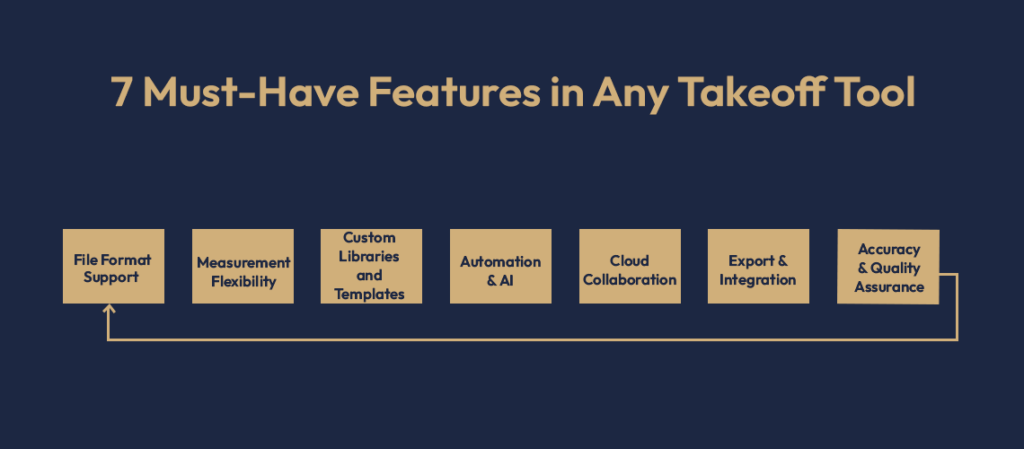
Not all software is created equal. If you’re evaluating options, here are the features that matter most:
- File Format Support
- Must handle PDFs, DWGs, DXFs, and BIM files.
- Without broad compatibility, your workflow hits roadblocks.
- Measurement Flexibility
- A good construction material takeoff software measures length, area, volume, and count.
- Auto-counting features save hours but should be double-checked.
- Custom Libraries and Templates
- Ability to create assemblies (e.g., wall types, flooring) and reuse them.
- Saves time across repetitive projects.
- Automation & AI
- Automated recognition is trending, but accuracy depends on plan clarity.
- Great for quick drafts, not always for final bids.
- Cloud Collaboration
- Essential for teams working across offices or job sites.
- Look for role permissions and change tracking.
- Export & Integration
- Should connect with Excel, project management tools, or estimating software.
- Manual re-entry wastes time and risks errors.
- Accuracy & Quality Assurance
- The most critical feature. No matter how “fast,” a wrong takeoff can cost thousands.
Here’s the takeaway: even the best takeoff software for construction estimating won’t replace a skilled estimator’s judgment. Software speeds up tasks, but you still carry the risk of accuracy.
Pros and Cons of Using Takeoff Software

Advantages of Takeoff Software
- Speed: Digital measurements can cut hours compared to manual methods.
- Consistency: Standardized libraries reduce variation between projects.
- Professionalism: Delivering neat, exportable takeoffs builds client trust.
- Scalability: Especially true for larger firms running frequent projects.
Limitations of Takeoff Software
- Cost: Licenses, updates, and training can be expensive.
- Learning Curve: Many contractors underestimate how long it takes to master the software.
- Maintenance: Updates, integrations, and IT support are ongoing needs.
- Risk of Errors: Auto-counts and AI tools are not always reliable. You remain accountable for mistakes.
The Hidden Factor: Time
Even with the top construction takeoff software, the time you spend learning, managing, and double-checking might outweigh the benefits — especially if estimating is not your full-time role.
That’s why many contractors eventually ask: is there a smarter alternative?
When to Use Software vs. When to Outsource
When Software is the Right Choice
- You run frequent projects with an in-house estimating team.
- You want complete control of margins and databases.
- You have time to learn and optimize the tool.
When Outsourcing is Smarter
- Your project volume is irregular, so software cost isn’t justified.
- You’re pressed for time and need results without a learning curve.
- You want guaranteed accuracy backed by professionals.
- You’d rather focus on managing crews, clients, and bids than on software training.
When you use the Hybrid Approach
Some firms use construction plan takeoff software for simple, repeat jobs and outsource complex or large-scale projects. This balance keeps costs down while ensuring accuracy on high-value bids.
Think of it this way: if you spend 20 hours learning software and 5 hours per project on takeoffs, that’s weeks of time you can’t get back. Outsourcing can deliver the same (or better) results at a fixed cost — with zero risk of user error.
Case Example: The Real Cost of Doing It All Yourself
Imagine a mid-sized contractor bidding on multiple projects. They invest in best construction takeoff estimating software with hopes of saving time. At first, things go well — until the learning curve and hidden costs surface:
- The estimator spends 30+ hours training.
- A rushed takeoff misses key rebar quantities.
- The project is underbid by thousands, leading to losses.
Contrast that with outsourcing the same project:
- Plans are uploaded.
- A professional team delivers the takeoff in 48 hours.
- Accuracy is verified, and the bid is competitive.
Result: Best estimating takeoff software is a process when contractor submits more bids, with higher confidence, and wins more projects.
Comparison: Software vs. Outsourced Estimation
| Factor | Takeoff Software | Outsourced Estimation |
| Upfront Cost | High (licenses/training) | None |
| Learning Curve | Steep | None |
| Turnaround | DIY hours/days | Delivered in hours/days |
| Accuracy | Depends on user | Professionally verified |
| Scalability | Limited to your time | Flexible, project-based |
| Risk | On you | On provider |
Even the best construction takeoff software has its place, but outsourcing shifts risk off your shoulders while giving you back your time.
Tips for Choosing Takeoff Solutions
If you still want to try construction estimating takeoff tools, keep these tips in mind:
- Start with free trials before committing.
- Run a pilot project to test accuracy.
- Check how well it integrates with your workflow.
- Watch out for hidden fees (updates, add-ons).
- Always double-check automated outputs.
And remember: you don’t have to pick just one path. Many contractors use digital takeoff software for contractors for small projects and outsource bigger bids to maximize efficiency.
Final verdict: Cesol is the One Stop Solution
The construction world runs on accurate takeoffs. While construction takeoff software can streamline workflows, it isn’t always the perfect fit. For many contractors, the smarter choice is outsourcing — saving time, cutting costs, and avoiding errors.
If you would like to see how outsourcing takeoff can work for you, request a free sample takeoff or quote today. Save hours, reduce risk, and win more bids without the hassle of mastering software.
Visit our website today at cesol
FAQ
2D construction takeoff software works on flat drawings, while BIM-integrated civil construction takeoff software pulls directly from 3D models.
Yes, construction estimating takeoff tools speed up work, but accuracy still relies on user skill.
Yes, by outsourcing. You can get professional results without investing in best takeoff software for construction.
Combining construction material takeoff software with professional review, or outsourcing directly for error-free estimates.
For smaller firms, the best construction takeoff software is usually one that balances affordability with ease of use. Desktop-based 2D construction takeoff software works well for quick measurements on residential or small commercial jobs.